xml
<dependency>
    <groupId>com.alibaba</groupId>
    <artifactId>easyexcel</artifactId>
    <version>4.0.3</version>
</dependency>

<dependency>
    <groupId>cn.idev.excel</groupId>
    <artifactId>fastexcel</artifactId>
    <version>1.1.0</version>
</dependency>
❤️ 读
💛 简单读取
💙 有 pojo
- 定义接收的 excel 实体类
java
@Data
public class PurchaseHistoryExcelData {
    private Long userId;  // 用户id
    private UserPurchaseHistoryBO.PurchaseCategory purchaseCategory;  // 商品类型(生鲜、家居、数码 ……)
    private String purchaseName;  // 商品名称
    private double purchasePrice;  // 商品价格
}- 读取数据
- 定义数据监听器,或者内部类,来处理每一行数据(监听器不能被 Spring 管理,每次读取 Excel 时需要重新实例化)
invoke读取每一行数据时的操作doAfterAllAnalysed读取完成后的操作
sheet(Integer/String)- 如果没有参数,默认读取第一个工作表
- 可以给定数值,或者工作表的名字
doRead执行读取操作
- 定义数据监听器,或者内部类,来处理每一行数据(监听器不能被 Spring 管理,每次读取 Excel 时需要重新实例化)
java
FastExcel.read("path/to/demo.xlsx", UserPurchaseHistoryBO.class, new AnalysisEventListener<UserPurchaseHistoryBO>() {
	private final List<UserPurchaseHistoryBO> userPurchaseHistoryBOList = new ArrayList<>();

	@Override
	public void invoke(UserPurchaseHistoryBO userPurchaseHistoryBO, AnalysisContext analysisContext) {
		userPurchaseHistoryBOList.add(userPurchaseHistoryBO);
	}

	@Override
	public void doAfterAllAnalysed(AnalysisContext analysisContext) {
		securityRepo.writePurchaseHistoryFromExcel(userPurchaseHistoryBOList);
	}
}).sheet().doRead();
💙 无 pojo
Map<Integer, String> data 的每一个元素表示一行数据。key 是列的索引,value 是单元格的值
java
FastExcel.read(inputStream, new AnalysisEventListener<Map<Integer, String>>() {
	private List<Map<Integer, String>> cachedDataList = new ArrayList<>();
	private Map<Integer, String> headMap;

	@Override
	public void invokeHeadMap(Map<Integer, String> headMap, AnalysisContext context) {
		this.headMap = headMap;
	}

	@Override
	public void invoke(Map<Integer, String> data, AnalysisContext context) {
		cachedDataList.add(new LinkedHashMap<>(data));
	}

	@Override
	public void doAfterAllAnalysed(AnalysisContext context) {
		if (!cachedDataList.isEmpty()) testValueLogService.importData(batchId, headMap, cachedDataList);
	}
}).sheet().doRead();
💛 复杂读取
💙 转换器
当 excel 数据格式与定义的 pojo 不匹配时,需要使用转换器进行转换
- 定义转换器
supportJavaTypeKey告诉框架支持的 java 类型supportExcelTypeKey告诉框架支持的 excel 类型convertToJavaData将 Excel 数据转换为 Java 数据convertToExcelData将 Java 数据转换为 Excel 数据
java
public class CustomStringStringConverter implements Converter<String> {
    @Override
    public Class<?> supportJavaTypeKey() {
        return String.class;
    }

    @Override
    public CellDataTypeEnum supportExcelTypeKey() {
        return CellDataTypeEnum.STRING;
    }

    @Override
    public String convertToJavaData(ReadConverterContext<?> context) {
        return "自定义:" + context.getReadCellData().getStringValue();
    }

    @Override
    public WriteCellData<?> convertToExcelData(WriteConverterContext<String> context) {
        return new WriteCellData<>(context.getValue());
    }
}- 使用转换器
java
@ExcelProperty(converter = StringEnumConverter.class)
private PurchaseCategory purchaseCategory;
💛 web 读取
java
@PostMapping("/v1/writePurchaseHistoryFromExcel")
public ResponseEntity<JsonNode> writePurchaseHistoryFromExcel(MultipartFile file) {
	if (file.isEmpty()) return ZakiResponse.error("文件为空!");
	FastExcel.read(file.getInputStream(), UserPurchaseHistoryBO.class, new AnalysisEventListener<UserPurchaseHistoryBO>() {
	    private final List<UserPurchaseHistoryBO> userPurchaseHistoryBOList = new ArrayList<>();

	    @Override
	    public void invoke(UserPurchaseHistoryBO userPurchaseHistoryBO, AnalysisContext analysisContext) {
	        userPurchaseHistoryBOList.add(userPurchaseHistoryBO);
	    }

	    @Override
	    public void doAfterAllAnalysed(AnalysisContext analysisContext) {
	        securityRepo.writePurchaseHistoryFromExcel(userPurchaseHistoryBOList);
	    }
	}).sheet().doRead();

	return ZakiResponse.ok("文件上传成功,数据已写入数据库");
}
❤️ 写
数据量小于 5000 行 :
write(文件名,excel实体)定义参数配置- 筛选
excludeColumnFieldNames(需要被排除的字段集合)排除 excel 实体中不需要的字段includeColumnFieldNames(只需保留的字段集合)选出 excel 实体中需要的字段
sheet(名称)底部工作表的名称doWrite(集合数据)将集合数据写入文件
java
// 定义文件路径
String fileName = "E:\\文档\\测试一下.xlsx";
EasyExcel.write(fileName, DemoData.class)
		.sheet("模板")
		// 排除date列
		.excludeColumnFieldNames(List.of("date"))
		.includeColumnFieldNames(List.of("title"))
		.doWrite(List.of(
				DemoData.builder().title("吃饭").date(LocalDate.now()).number(23d).build(),
				DemoData.builder().title("睡觉").date(LocalDate.now()).number(2d).build(),
				DemoData.builder().title("敲代码").date(LocalDate.now()).number(299d).build()
		));
数据量大 :
java
String fileName = "E:\\文档\\测试一下.xlsx";
// 用文件名构建出的ExcelWriter,可以在释放资源之前多次写入数据
try (ExcelWriter excelWriter = EasyExcel.write(fileName).build()) {
	for (int i = 0; i < 4; i++) {
		// 构建配置
		WriteSheet writeSheet = EasyExcel.writerSheet("工作表1")
				.head(DemoData.class)
				.build();
		// 构建数据
		List<DemoData> dataList = List.of(
				DemoData.builder().title("吃饭").date(LocalDate.now()).number(23d).build(),
				DemoData.builder().title("睡觉").date(LocalDate.now()).number(2d).build(),
				DemoData.builder().title("敲代码").date(LocalDate.now()).number(299d).build()
		);
		// 写入数据
		excelWriter.write(dataList, writeSheet);
	}
}
💛 实体类写入
💙 定义 excel 实体类
@ExcelProperty列属性- value 列名
- index 列的位置
- converter 定义内容的转换器
@ExcelIgnore忽略某个字段- 样式
@ContentRowHeight(30)行高@HeadRowHeight(20)头行高@ColumnWidth(20)列宽
java
@Data
@ContentRowHeight(30)
@HeadRowHeight(20)
@ColumnWidth(20)
public class DemoData {
	@ExcelProperty(value = "标题", index = 0)
	private String title;
	@ExcelProperty(value = "日期", index = 1)
	private LocalDate date;
	@ColumnWidth(7)
	@ExcelProperty(value = "数字", index = 2)
	private Double number;

    @ExcelIgnore
    private String ignore;
}
💙 合并列
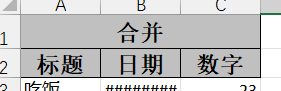
java
@Data
public class DemoData {
    @ExcelProperty(value = {"合并", "标题"}, index = 0)
    private String title;
    @ExcelProperty(value = {"合并", "日期"}, index = 1)
    private LocalDate date;
    @ExcelProperty(value = {"合并", "数字"}, index = 2)
    private Double number;
}
💙 合并单元格
- 类上注解
@OnceAbsoluteMerge(firstRowIndex = 5, lastRowIndex = 6, firstColumnIndex = 1, lastColumnIndex = 2)将第 6 - 7 行的 2 - 3 列合并成一个单元格 - 属性上注解
@ContentLoopMerge(eachRow = 2)这一列上,每隔 2 行,合并单元格
java
@Data
// @OnceAbsoluteMerge(firstRowIndex = 5, lastRowIndex = 6, firstColumnIndex = 1, lastColumnIndex = 2)
public class DemoMergeData {
    @ContentLoopMerge(eachRow = 2)
    @ExcelProperty(value = "标题", index = 0)
    private String title;
    @ExcelProperty(value = "日期", index = 1)
    private LocalDate date;
    @ExcelProperty(value = "数字", index = 2)
    private Double number;
}
💙 单元格内换行
@ContentStylewrapped是否自动换行- BooleanEnum.TRUE 开启自动换行
java
@ContentStyle(wrapped = BooleanEnum.TRUE)
public class UnRegisteredWorkingHoursStatistics {
    @ExcelProperty(value = "用户姓名")
    private String userName;
    @ExcelProperty(value = "一级部门名称")
    private String firstLevelDepartmentName;
    @ExcelProperty(value = "部门名称")
    private String departmentName;
    @ExcelProperty(value = "未报工日期")
    private String unRegisteredDates;
    @ExcelProperty(value = "报工但未被审批的日期")
    private String unApprovedDates;
    @ExcelProperty(value = "审批人")
    private String approvalUserName;
}- 写入时,以
\n作为换行标识
java
EasyExcel.write(response.getOutputStream(), UnRegisteredWorkingHoursStatistics.class)
		.sheet("工作表 1")
		.doWrite(List.of(
				UnRegisteredWorkingHoursStatistics.builder()
						.userName("张三")
						.firstLevelDepartmentName("技术部")
						.departmentName("研发部\n研发部\n拉拉部")
						.unRegisteredDates("2021-08-01,2021-08-02")
						.unApprovedDates("2021-08-03")
						.approvalUserName("李四")
						.build(),
				UnRegisteredWorkingHoursStatistics.builder()
						.userName("王五")
						.firstLevelDepartmentName("技术部\n研发部\n拉拉部")
						.departmentName("研发部")
						.unRegisteredDates("2021-08-01,2021-08-02")
						.unApprovedDates("2021-08-03")
						.approvalUserName("赵六")
						.build()
		));
💙 图片写入
java
@Data
public class DemoData {
    @ExcelProperty(value = {"合并", "标题"}, index = 0)
    private String title;
    @ExcelProperty(value = {"合并", "日期"}, index = 1)
    private LocalDate date;
    @ExcelProperty(value = {"合并", "数字"}, index = 2)
    private Double number;
    @ExcelProperty(value = "图片", index = 3)
    private URL url;
}
java
String fileName = "E:\\文档\\测试一下-2.xlsx";
List<DemoData> dataList = List.of(DemoData.builder()
		.title("老虎")
		.date(LocalDate.now())
		.number(666d)
		.url(new URL("https://img0.baidu.com/it/u=3859870425,2680506619&fm=253&fmt=auto&app=120&f=JPEG?w=500&h=750"))
		.build());

EasyExcel.write(fileName, DemoData.class)
		.sheet()
		.doWrite(dataList);
💙 向 Web 写入
java
@GetMapping("/getExcel")
public void getExcel(HttpServletResponse response) {
	String fileName = URLEncoder.encode("提单列表数据.xlsx", StandardCharsets.UTF_8);
	response.setContentType("application/vnd.openxmlformats-officedocument.spreadsheetml.sheet");
	response.setCharacterEncoding("utf-8");
	response.setHeader("Content-Disposition", "attachment; filename=\"" + fileName + "\"; filename*=UTF-8''" + fileName);

	EasyExcel.write(response.getOutputStream(), DemoData.class)
	        .sheet("工作表 1")
	        .doWrite(List.of(DemoData.builder()
	                .title("吃饭")
	                .date(LocalDate.now())
	                .number(23d)
	                .build()
	        ));
}
💛 无实体类写入
java
EasyExcel.write("E:\\文档\\测试一下.xlsx")
		.head(List.of(
		        List.of("标题"),
		        List.of("数字")
		))
		.sheet()
		.doWrite(List.of(
			Arrays.asList("吃饭", 23d),
			Arrays.asList("睡觉", 2d),
			Arrays.asList("敲代码", 299d)
		));

EasyExcel.write(response.getOutputStream())
		.head(List.of(
		        List.of("标题"),
		        List.of("数字")
		))
		.sheet()
		.doWrite(List.of(
			Arrays.asList("吃饭", 23d),
			Arrays.asList("睡觉", 2d),
			Arrays.asList("敲代码", 299d)
		));
💙 列宽行高
- 统一设置
java
.registerWriteHandler(new SimpleColumnWidthStyleStrategy(17))
.registerWriteHandler(new SimpleRowHeightStyleStrategy((short) 25, (short) 25))- 设置具体行,具体列
java
.registerWriteHandler(new SheetWriteHandler() {
	@Override
	public void afterSheetCreate(WriteWorkbookHolder writeWorkbookHolder, WriteSheetHolder writeSheetHolder) {
		Sheet sheet = writeSheetHolder.getSheet();
		sheet.setColumnWidth(0, 28 * 256);  // 设置第一列宽度为 28
		sheet.setColumnWidth(1, 88 * 256);  // 设置第二列宽度为 88
	}
})
💙 居中
java
WriteCellStyle contentStyle = new WriteCellStyle();
contentStyle.setHorizontalAlignment(HorizontalAlignment.CENTER); // 水平居中
contentStyle.setVerticalAlignment(VerticalAlignment.CENTER);   // 垂直居中

EasyExcel.write(response.getOutputStream())
        .head(List.of(
                List.of("字符串"),
                List.of("数字"),
                List.of("日期")
        ))
        .registerWriteHandler(new HorizontalCellStyleStrategy(
                contentStyle, contentStyle
        ))
        .sheet("工作表 1")
        .doWrite(Arrays.asList(
                Arrays.asList("字符串1", 123, LocalDate.now()),
                Arrays.asList("字符串2", 123, LocalDate.now()),
                Arrays.asList("字符串3", 789, LocalDate.now())
        ));
💙 合并单元格
java
EasyExcel.write("E:\\文档\\测试一下.xlsx")
		.head(List.of(
		        List.of("标题"),
		        List.of("数字")
		))
		.sheet()
		// 设置策略,每两行就合并,从第一行就开始作用
		.registerWriteHandler(new LoopMergeStrategy(2, 0))
		.doWrite(List.of(
			Arrays.asList("吃饭", 23d),
			Arrays.asList("睡觉", 2d),
			Arrays.asList("敲代码", 299d)
		));
💛 常用策略
java
/**
 * Excel 导出的 strategy 类
 */
public class ExcelStrategy {

    /**
     * 创建默认的样式策略
     * 表头:居中、灰色背景、加粗
     * 内容:居中
     */
    public static HorizontalCellStyleStrategy horizontalCellStyleStrategy() {
        // 表头样式
        WriteCellStyle headStyle = new WriteCellStyle();
        headStyle.setHorizontalAlignment(HorizontalAlignment.CENTER);
        headStyle.setVerticalAlignment(VerticalAlignment.CENTER);
        headStyle.setFillForegroundColor(IndexedColors.GREY_25_PERCENT.getIndex());
        headStyle.setFillPatternType(FillPatternType.SOLID_FOREGROUND);
        WriteFont headFont = new WriteFont();
        headFont.setBold(true);
        headFont.setFontHeightInPoints((short) 11);
        headStyle.setWriteFont(headFont);

        // 内容样式
        WriteCellStyle contentStyle = new WriteCellStyle();
        contentStyle.setHorizontalAlignment(HorizontalAlignment.CENTER);
        contentStyle.setVerticalAlignment(VerticalAlignment.CENTER);

        return new HorizontalCellStyleStrategy(headStyle, contentStyle);
    }

    /**
     * 通用的合并策略,根据指定字段合并前几列
     *
     * @param <T> 数据类型
     */
    @AllArgsConstructor
    public static class GenericMergeStrategy<T> implements SheetWriteHandler {

		private final List<T> data;                      // 数据列表
		private final int mergeColumnCount;              // 要合并的列数
		private final Function<T, String> keyExtractor;  // 提取合并 key 的函数(如:PurchaseOrderAggregateVO::getOrderNo)

        @Override
        public void afterSheetCreate(WriteWorkbookHolder writeWorkbookHolder, WriteSheetHolder writeSheetHolder) {
            Sheet sheet = writeSheetHolder.getSheet();

            if (data == null || data.size() <= 1) {
                return;
            }

            int startRow = 1; // 数据起始行(第2行,索引为1)
            int count = 1;    // 当前key的行数

            for (int i = 1; i < data.size(); i++) {
                String currentKey = keyExtractor.apply(data.get(i));
                String previousKey = keyExtractor.apply(data.get(i - 1));

                if (currentKey != null && currentKey.equals(previousKey)) {
                    // 相同的key,累计行数
                    count++;
                } else {
                    // 不同了,处理前面累计的行
                    mergeRows(sheet, startRow, count);
                    startRow = i + 1; // 新组的起始行
                    count = 1;
                }
            }

            // 处理最后一组
            mergeRows(sheet, startRow, count);
        }

        /**
         * 合并指定行
         *
         * @param sheet    Excel sheet
         * @param startRow 起始行(从1开始)
         * @param rowCount 要合并的行数
         */
        private void mergeRows(Sheet sheet, int startRow, int rowCount) {
            // 只有行数>=2时才合并
            if (rowCount >= 2) {
                int endRow = startRow + rowCount - 1;
                for (int col = 0; col < mergeColumnCount; col++) {
                    CellRangeAddress region = new CellRangeAddress(startRow, endRow, col, col);
                    sheet.addMergedRegion(region);
                }
            }
        }
    }

}
实验功能
自适应行高
java
import com.alibaba.excel.metadata.Head;
import com.alibaba.excel.write.handler.WriteHandler;
import org.apache.poi.ss.usermodel.Cell;
import org.apache.poi.ss.usermodel.Row;
import org.apache.poi.ss.usermodel.Sheet;

public class CustomRowHeightHandler implements WriteHandler {

    @Override
    public void beforeCellCreate(Sheet sheet, Row row, Head head, int relativeRowIndex, int columnIndex, boolean isHead) {
        // Do nothing before cell creation
    }

    @Override
    public void afterCellDispose(Cell cell, Head head, int relativeRowIndex, boolean isHead) {
        if (!isHead) {
            // 获取当前单元格内容长度
            String cellValue = cell.getStringCellValue();
            if (cellValue != null) {
                // 根据内容长度动态设置行高
                int contentLength = cellValue.length();
                int rowHeight = Math.min(255, contentLength * 20); // 根据长度设置行高(最大行高为 255)
                cell.getRow().setHeight((short) rowHeight);
            }
        }
    }
}
java
import com.alibaba.excel.EasyExcel;
import com.alibaba.excel.write.handler.WriteHandler;

import java.util.List;

public class ExcelExporter {
    public static void main(String[] args) {
        // 假设数据为以下列表
        List<UnRegisteredWorkingHoursStatistics> data = fetchData();

        // 写入 Excel
        EasyExcel.write("output.xlsx", UnRegisteredWorkingHoursStatistics.class)
                .registerWriteHandler(new CustomRowHeightHandler()) // 注册自定义行高处理器
                .sheet("Sheet1")
                .doWrite(data);
    }

    public static List<UnRegisteredWorkingHoursStatistics> fetchData() {
        // 模拟数据获取
        return List.of(
            new UnRegisteredWorkingHoursStatistics("张三", "研发部", "开发组", "2024-11-01,2024-11-02", "2024-11-03", "李四"),
            new UnRegisteredWorkingHoursStatistics("李四", "销售部", "销售组", "2024-11-05", "2024-11-06,2024-11-07", "王五")
        );
    }
}
杂
java
// Alternatively, you can read without specifying a class, returning a list, then read the first sheet.
// Synchronous reading will automatically finish.
List<Map<Integer, String>> listMap = EasyExcel.read(fileName).sheet().doReadSync();
for (Map<Integer, String> data : listMap) {
	// Return key-value pairs for each data item, representing the column index and its value.
	log.info("Read data:{}", JSON.toJSONString(data));
}