[!quote] CSS 语法
- 注释:
/* 我是注释 */- 使用多个引号时,注意双引号里要使用单引号
❤ 选择器
优先级:id 选择器 > 类选择器 > 元素选择器
元素选择器
css
<style>
	h1,h2,h3 {          /*可以一次性选取多个元素*/
		xxx:yyy;
	}
	span {
		xxx:yyy;
	}
</style>
类选择器
- 类名相当于是一个标签,可以被多个元素重用
- 一个元素也可以贴多个标签【多个类】
- 类名不能以数字开头
css
<style>
	.a01 {
		xxx:yyy;
	}
	.a02 {
		xxx:yyy;
	}
</style>
html
<h1 class="a01">我是一级标题</h1>
<span class="a01 a02">我是正文</span>  <!-- 这个元素引用了两个类 -->
id 选择器
- id 不能重用
- id 不能以数字开头
- id 不能包含空白字符
css
<style>
	#001 {
		xxx:yyy;
	}
	#002 {
		xxx:yyy;
	}
</style>
html
<h1 id="001">我是一级标题</h1>
<span id="002">我是正文</span>
选择器的组合使用
css
/* 只有具有 class="center" 的 <p\> 元素会居中对齐 */
p.center {
  text-align: center;
  color: red;
}
通用选择器
通用选择器会影响页面上的每个 HTML 元素
css
* {
  text-align: center;
  color: blue;
}
属性选择器
选取带有指定属性的元素
| 选择器 | 例子 | 例子描述 |
|---|---|---|
| [attribute] | [target] | 选择带有 target 属性的所有元素 |
| [attribute=value] | [target=_blank] | 选择带有 target="_blank" 属性的所有元素 |
| [attribute~=value] | [title~=flower] | 选择带有包含 "flower" 一词的 title 属性的所有元素 |
| [attribute|=value] | [lang|=en] | 选择带有以 "en" 开头的 lang 属性的所有元素 |
| [attribute^=value] | a[href^="https"] | 选择其 href 属性值以 "https" 开头的每个<a>元素 |
| [attribute$=value] | a[href$=".pdf"] | 选择其 href 属性值以 ".pdf" 结尾的每个<a>元素 |
| [attribute*=value] | a[href*="w3school"] | 选择其 href 属性值包含子串 "w3school" 的每个<a>元素 |
css
/* 选取带有target属性的链接 */
a[target] {
	background-color: yellow;
}
css
/* 选取带有target属性,且属性值为_blank的链接 */
a[target=_blank] {
	background-color: blue;
}
css
/* 选取title属性包含单独的 "flower" 单词的所有元素,不包含title="my-flower" 或 title="flowers" */
[title~=flower] {
	border: 5px solid yellow;
}
css
<h1 class="top-header">Welcome</h1>         /* 匹配 */
<p class="top-text">Hello world!</p>      /* 匹配 */
<p class="topcontent">Are you learning CSS?</p>   /* 不匹配 */

/* 选取class属性以 "top" 开头的所有元素,值要是完整单词 */
<style>
	[class|=top] {
		background: yellow;
	}
</style>
css
/* 选取class属性以 "top" 开头的所有元素,值不用是完整单词 */
[class^="top"] {
	background: yellow;
}
css
/* 选取class属性以 "test" 结尾的所有元素,值不必是完整单词 */
[class$="test"] {
	background: yellow;
}
css
/* 选取class属性包含 "te" 的所有元素,值不必是完整单词 */
[class*="te"] {
	background: yellow;
}
组合器
[!quote] 组合器 选择器可以包含多个简单选择器,它们之间用组合器连接
- 后代选择器:指定元素后代的所有元素
css
/* 选择 <div> 元素内的所有 <p>元素 */
div p {
    background-color: yellow;
}- 子选择器:指定元素子元素里的所有元素
css
/* 选择 <div> 元素内第一子元素的 <p>元素,不包含嵌套的 <p>元素 */
div > p {
    background-color: yellow;
}- 相邻兄弟选择器:指定元素的相邻元素
css
/* 选择紧随<div>元素之后的<p>元素 */
div + p {
    background-color: yellow;
}- 通用兄弟选择器:指定元素后面的同级元素的所有元素
css
/* 选择<div>元素后面的同级元素的所有<p>元素 */
div ~ p {
    background-color: yellow;
}
❤ 引入方式
引入方式的优先级 行内样式 > 在 `head标签` 里内嵌样式 > 外联样式的顺序
行内样式
行内样式只作用于当前标签,不推荐采用,会降低可读性
css
<h1 style="xxx:yyy; xxx:yyy;">HTML 5</h1>内嵌样式
html
<!DOCTYPE html>
<html>

<head>
<style>
	选择器 {
		CSS属性名1: 值A;
		CSS属性名2: 值B;
	}
</style>
</head>

<body>
……
</body>

</html>
外联样式
css
h1 {
	xxx:yyy;
}
html
<!DOCTYPE html>
<html>
	<head>
		<link rel="stylesheet" href="路径">  <!-- 在head标签中指定css文件的路径 -->
	</head>
	<body>
		<h1>This is a heading</h1>
		<p>This is a paragraph.</p>
	</body>
</html>
❤ 单位
绝对单位
绝对长度 表示的长度都将恰好显示为这个尺寸,不建议在屏幕上使用绝对长度单位,因为屏幕尺寸变化很大
| 单位 | 描述 |
|---|---|
| cm | 厘米 |
| mm | 毫米 |
| in | 英寸 (1in = 96px = 2.54cm) |
| px | 像素 (1px = 1/96th of 1in) |
| pt | 点 (1pt = 1/72 of 1in) |
| pc | 派卡 (1pc = 12 pt) |
相对单位
相对长度 规定相对于另一个长度属性的长度,相对长度单位在不同渲染介质之间缩放表现得更好
| 单位 | 描述 |
|---|---|
| em | 相对于元素的字体大小(2em 表示当前字体大小的 2 倍) |
| ex | 相对于当前字体的 x-height(极少使用) |
| ch | 相对于 "0"(零)的宽度 |
| rem | 相对于根元素的字体大小 |
| vw | 相对于视口宽度的 1% |
| vh | 相对于视口高度的 1% |
| vmin | 相对于视口较小尺寸的 1% |
| vmax | 相对于视口较大尺寸的 1% |
| % | 相对于父元素 |
视口 = 浏览器窗口的尺寸
em 和 rem 可用于创建完美的可扩展布局
❤ 颜色
background-color:Tomatorgb(255, 99, 71)#ff6347hsl(9, 100%, 64%)rgba(255, 99, 71, 0.5)hsla(9, 100%, 64%, 0.5)
❤ 框模型
元素总宽度 = width + 左右 padding + 左右 border + 左右 margin + outline 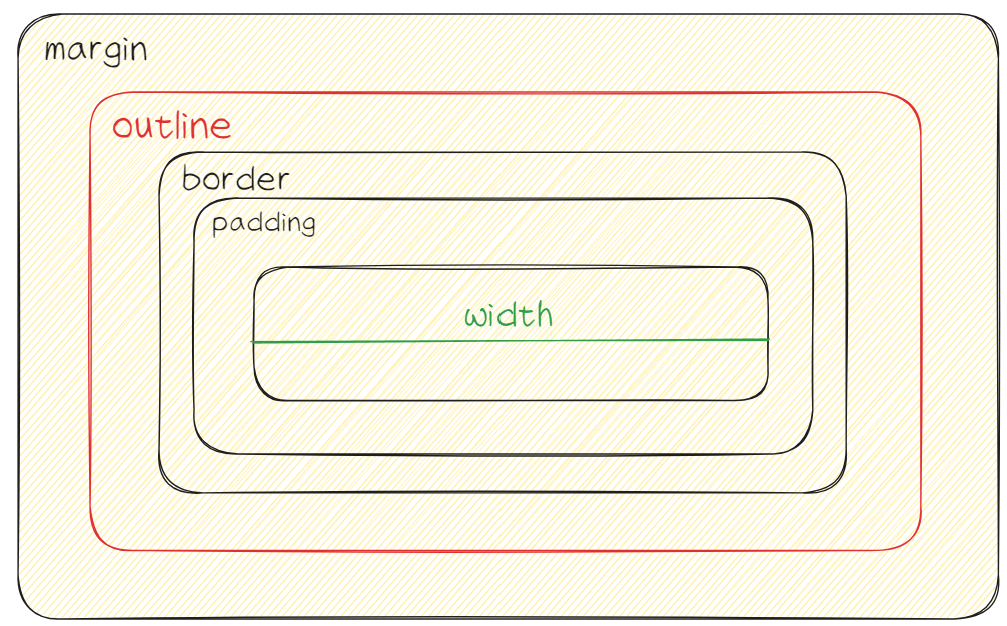
[!summary] 属性
background背景border边框margin外边距【允许负值】padding内边距【呈现元素的背景,不允许负值】width宽度【只是内容,不包括 padding,margin,border】height高度box-sizing设定 width 和 height 指的是哪个盒子
content-box【默认值】仅包括内容区域border-box包括内容,padding,borderpadding-box包括内容,paddinginherit继承父元素outline轮廓
背景
[!quote] 背景
背景 = padding + 内容
- 内容为颜色
background-color指定背景色【可以为任何 HTML 元素设置背景颜色】
opacity指定透明度【会影响子元素,使用 RGBa 不会】- 内容为图片
background-image: url('链接')指定背景图像
默认情况下,`background-image` 在水平和垂直方向上都重复图像,直到铺满整个指定元素
参数
background-repeat指定背景内容是否重复显示background-origin模糊的背景位置- border-box 从边框的左上角开始
- padding-box 【默认】从内边距边缘的左上角开始
- content-box 从内容的左上角开始
background-position指定具体背景的位置background-attachment指定背景滚动 / 固定background-size背景的尺寸background-clip背景的绘制区域- border-box 【默认】背景绘制到边框的外部边缘
- padding-box 背景绘制到内边距的外边缘
- content-box 在内容框中绘制背景
css
/* background-repeat */
background-repeat: repeat-x;  /* 在水平方向重复 */
background-repeat: repeat-y;   /* 在垂直方向重复 */
background-repeat: no-repeat;   /* 不重复 */
css
/* background-origin */
background-origin: border-box;
background-origin: padding-box;
background-origin: content-box;
css
/* background-position */
background-position: right top;  /* 右上角 */

background-position: 100px 200px;  /* 裁剪图片的这个部分 */
css
/* background-attachment */
background-attachment: fixed;  /* 固定 */
background-attachment: scroll;  /* 滚动 */
css
/* background-size */
background-size: 30%;    /* 固定尺寸 */
background-size: contain;    /* 背景框中会显示完整的最大尺寸的图像 */
background-size: cover;     /* 背景框中会显示不完整的覆盖整个背景框的图像 */
css
/* background-clip */
background-clip: border-box;
background-clip: padding-box;
background-clip: content-box;
多重背景
可以为背景指定多张图片
css
#example1 {
	background-image: url(/i/photo/flower.gif), url(/i/paper.jpg);
	background-position: right bottom, left top;
	background-repeat: no-repeat, repeat;
	background-size: 30%, 100%;
	padding: 15px;
}
边框
[!summary] 属性
border-style边框的样式border-width宽度border-colorborder-radius添加圆角
简写 `border: width style color;`
样式
css
<p style="border-style: dotted;">hello</p>
<p style="border-style: dashed;">hello</p>
<p style="border-style: solid;">hello</p>
<p style="border-style: double;">hello</p>
<p style="border-style: groove;">hello</p>
<p style="border-style: ridge;">hello</p>
<p style="border-style: inset;">hello</p>
<p style="border-style: outset;">hello</p>
<p style="border-style: none;">hello</p>   /* 无边框 */
<p style="border-style: hidden;">hello</p>   /* 隐藏边框 */
<p style="border-style: dotted dashed solid double;">hello</p>   /* 混合边框 */

/* 单独指定样式 */
p {
  border-top-style: dotted;
  border-right-style: solid;
  border-bottom-style: dotted;
  border-left-style: solid;
}
参数
- 宽度
css
/* 直接指定数值 */
<p style="border-style: groove; border-width: 10px;">hello</p>

/* 指定预定义值 */
<p style="border-style: groove; border-width: thin;">hello</p>
<p style="border-style: groove; border-width: medium;">hello</p>
<p style="border-style: groove; border-width: thick;">hello</p>

/* 上边框 25px,右边框 10px,下边框 4px,左边框 35px */
<p style="border-style: groove; border-width: 25px 10px 4px 35px;">hello</p>- 颜色
css
<p style="border-style: groove; border-color: red;">hello</p>

/* 上红、右绿、下蓝、左黄 */
<p style="border-style: groove; border-color: red green blue yellow;">hello</p>
如果不要颜色的话可以指定为 `color:transparent;` ,表示 _**透明色**_
- 圆角
border-top-left-radius左上border-top-right-radius右上border-bottom-right-radius右下border-bottom-left-radius左下
css
<p style="border-style: groove; border-radius: 12px;">hello</p>内外边距
css
/* 允许指定单个外边距 */
p {
  margin-top: 100px;    /* 指定数值 */
  margin-bottom: auto;   /* 在其容器中水平居中 */
  margin-right: inherit;    /* 继承父元素的外边距 */
  margin-left: 80px;
}
轮廓
[!summary] 属性
outline-style样式
dotted点状轮廓dashed虚线轮廓solid实线轮廓double双线轮廓groove3D 凹槽轮廓ridge3D 凸槽轮廓inset3D 凹边轮廓outset3D 凸边轮廓none无轮廓hidden隐藏轮廓outline-coloroutline-widthoutline-offset轮廓偏移【轮廓与 border 之间的空间】
❤ 文本
基础属性
color指定文本的颜色font-size指定文本的大小【普通文本默认大小为 16px】pxemvm
font-family指定字体- 有多个字体时,应以逗号分隔
- 字体名称不止一个单词,则必须用引号引起来
font-style斜体font-weight粗体font-variant变体
css
/* color, font-size, font-family */
<p style="color:Tomato; font-size:30px; font-family: serif, Times;">China</p>

p {
	color:Tomato;

	font-size: 1em;  /* em允许用户在浏览器菜单中调整文本大小,1em = 16px */
	font-size:10vw;  /* vm可以根据浏览器窗口的大小,调整字体大小 */
}
China
css
/* 指定字体文件 */
font-family: serif, Times;

/* 指定网络字体 */
@font-face {
	font-family: myFirstFont;     /* 定义字体的名称 */
	src: url(sansation_light.woff);    /* 指定字体url */
}

div {
	font-family: myFirstFont;     /* 使用 */
}
css
p {
  font-style: italic;  /* 斜体 */
}

p {
  font-weight: bold;  /* 粗体 */
}

p {
  font-variant: small-caps;  /* 将所有字母大写,但是大写的字母size和小写差不多 */
}
位置
text-align水平对齐leftcenterright
justify将文本内容拉伸至每一行都具有相同宽度vertical-align垂直对齐【当文本与其他元素的相对位置】top其他元素相对于文本位于上部middle居中bottom
direction文本方向ltr从左到右rtlinherit
css
/* vertical-align */
<p style = "vertical-align:top;">一幅 <img src="https://obsidian-1307744200.cos.ap-guangzhou.myqcloud.com/%E5%9B%BE%E7%89%87%2F20230805115646.png"> 上对齐的图像</p>

/* direction */
<p style = "direction:rtl;"> hello </p>
一幅  上对齐的图像
hello
其他属性
装饰
initial默认值inherit从其父元素继承属性text-decoration指定线条的位置text-decoration-style指定线条的样式solid实线wavy波浪线double双线dotted点线dashed虚线
text-decoration-thickness指定线条的粗细auto……px……%
css
/* 删除所有文本装饰【常用于删除超链接的下划线】 */
<p style="text-decoration:none;">hello</p>
/* 上划线 */
<p style="text-decoration:overline;">hello</p>
/* 下划线 */
<p style="text-decoration:underline;">hello</p>
/* 删除线 */
<p style="text-decoration:line-through;">hello</p>
/* 多线 */
<p style="text-decoration:overline underline;">hello</p>
文本间距
css
p {
  text-indent: 50px;  /* 指定文本的首行缩进 */
}

h1 {
  letter-spacing: 3px;  /* 指定文本中每个 字符/字母 的间距 */
}

h1 {
  word-spacing: 10px;  /* 指定文本中每个 词语/单词 的间距 */
}

p.small {
  line-height: 0.8;  /* 指定文本行之间的间距 */
}

p {
  white-space: nowrap;  /* 空白处理,防止文本换行 */
}
文本转换
css
p.uppercase {
  text-transform: uppercase;   /* 把文本全部大写 */
}

p.lowercase {
  text-transform: lowercase;   /* 把文本全部小写 */
}

p.capitalize {
  text-transform: capitalize;  /* 把文本首字母大写 */
}
❤ 图片/视频
object-fit:- 保持宽高比
contain图片适应容器cover图片填满容器none原始尺寸
- 不保持宽高比
fill拉伸图片来填满
- 保持宽高比
列表
- 无序列表
ullist-style-type设置列表项目标记list-style-image用图像作为列表项目标记list-style-positon指定列表项目标记的位置
css
list-style-type: circle;
list-style-type: square;
list-style-type: disc;      /* 空心圆 */
list-style-type: none;        /* 表示删除项目符号 */

list-style-image: url('/i/photo/sqpurple.gif');

/* 默认 */
list-style-position: outside;
/* 项目符号将在列表项内,列表项为文本的一部分 */
list-style-position: inside;- 有序列表
ollist-style-type设置列表项目标记
css
list-style-type: upper-roman;
list-style-type: lower-alpha;
表格
- 边框
css
table, th, td {
  border: 1px solid black;
}

table {
	border-collapse: collapse;       /* 将td的边框与table边框合并为单一边框 */
	border-spacing: 0px;    /* 设置相邻单元格之间的边框的距离 */
	empty-cells:hide;      /* 不在空单元格上显示边框 */
}- 宽高
css
table {
  width: 100%;  /* 表格将铺满页面宽度*/
}

th {
	height: 50px; /* 仅设置标题的高度 */
}- 文本属性
text-align设置文本水平对齐方式vertical-align设置文本垂直对齐方式
- 斑马线表格
css
/* 使用nth-child选择器选择odd奇数 */
tr:nth-child(odd) {background-color: #f2f2f2;}

/* even为偶数 */
tr:nth-child(even) {background-color: #f2f2f2;}- 滚动条
css
<div style="overflow-x:auto;">  /* 加入overflow属性 */
  <table>
    <tr>
      <th>First Name</th>
      <th>Last Name</th>
      <th>Points</th>
      <th>Points</th>
      <th>Points</th>
    </tr>
    <tr>
      <td>Elon</td>
      <td>Musk</td>
      <td>67</td>
      <td>67</td>
      <td>67</td>
    </tr>
  </table>
</div>
透明度
opacity 用于指定元素的透明度,取值范围为 0.0【透明】 - 1.0【不透明】
css
img {
    opacity: 0.5;
}
滤镜
filter滤镜none【默认】blur(值)高斯模糊brightness(%)调整亮度,取值范围【0%-100%【默认】 -……】saturate(%)饱和度,取值范围【0%-100%【默认】 -……】
css
.element {
  /* 这里`5px`是模糊的半径,数值越大,模糊效果越明显 */
  filter: blur(5px);
}