1 HTML 初级
网页的结构
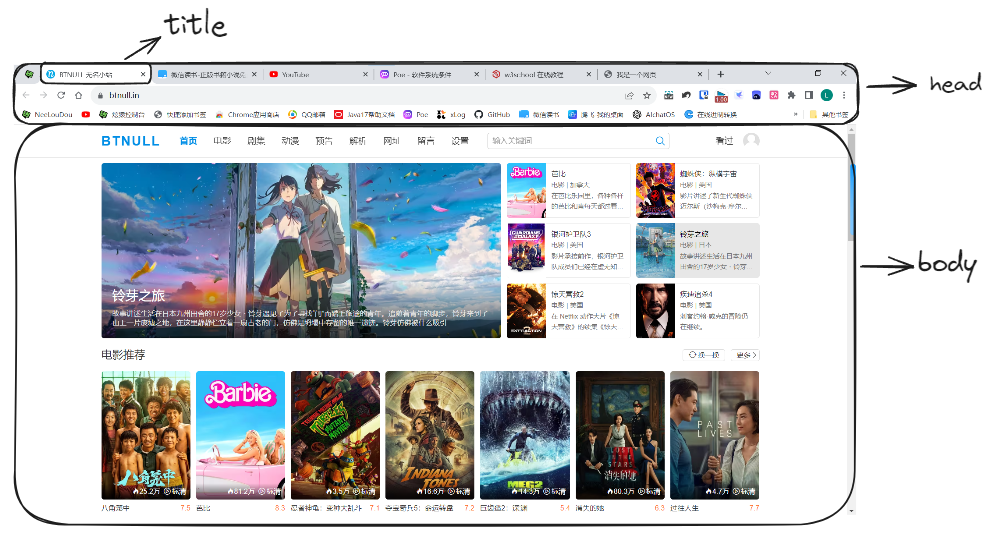
文件路径
使用 相对路径 是个好习惯
| 路径 | 描述 |
|---|---|
| <img src="picture.jpg"> | picture.jpg 位于与当前网页相同的文件夹 |
| <img src="images/picture.jpg"> | picture.jpg 位于当前文件夹的 images 文件夹中 |
| <img src="/images/picture.jpg"> | 位于当前站点根目录的 images 文件夹中 |
| <img src="../picture.jpg"> | 位于当前文件夹的上一级文件夹中 |
快捷键
! 生成骨架标签 ctrl+shift+/ 注释 ctrl+alt+l 格式化代码
img 生成图片标签
特殊字符
空格符 < < > > & & ¥ ¥ © © ® ® ° ℃ plusmn; 正负号 × 乘号 ÷ 除号 ² 平方² ³ 立方³
A 字母 A【使用 UTF-8 字符集(可以用字符集插入 emoji)】
字符集手册: https://www.w3school.com.cn/charsets/ref\_html\_8859.asp
骨架标签
<!doctype html>告诉浏览器使用 HTML 版本来显示网页<html lang="en">设置网页的语言。中文为“zh-CN”<meta charset="UTF-8">设置字符集合
<!DOCTYPE html>
<html lang="en">
<head>
    <meta charset="UTF-8">
    /* 页面的宽度以跟随设备的屏幕宽度,并设置浏览器首次加载页面时的初始缩放级别 */
    <meta name="viewport" content="width=device-width, initial-scale=1.0">
    <title>我是HTML 5</title>
</head>
</html>
头部标签
<title>文档的标题<base/>为页面上的所有链接规定默认地址,默认目标<link/>定义外部资源<meta/>元数据【对页面的描述,==重定向页面==……】,搜索引擎会根据 meta 的数据,来推荐给用户搜索结果
<head>
	<title>我是HTML 5</title>
	/* 页面上的链接只要不指定,默认就是打开以下链接 */
	<base href="http://www.w3school.com.cn/images/" />
	<base target="_blank" />    /* 页面上的链接只要不指定,默认就是在新页面打开 */
	<link rel="stylesheet" href="mystyle.css" />

	<meta name="description" content="Free Web tutorials on HTML, CSS, XML" />
	<meta name="keywords" content="HTML, CSS, XML" />
	/* 在5s之后,页面会重定向到指定的url */
	<meta http-equiv="Refresh" content="5;url=http://www.w3school.com.cn" />
</head>
布局标签
| 标签 | 描述 | 常用内容 |
|---|---|---|
| <header> | 文档或节 的页眉 | 介绍性内容的容器 |
| <nav> | 导航链接的容器 | |
| <section> | 文档中的节 | |
| <article> | 独立的自包含文章 | |
| <aside> | 内容之外的内容【侧栏】 | 内容应该与周围的内容有关 |
| <footer> | 文档或节 的页脚 | 文档的作者、版权信息、使用条款链接、联系信息… |
| <summary> | <details>的标题 |
- <main>
- <mark>
- <summary>
- <time>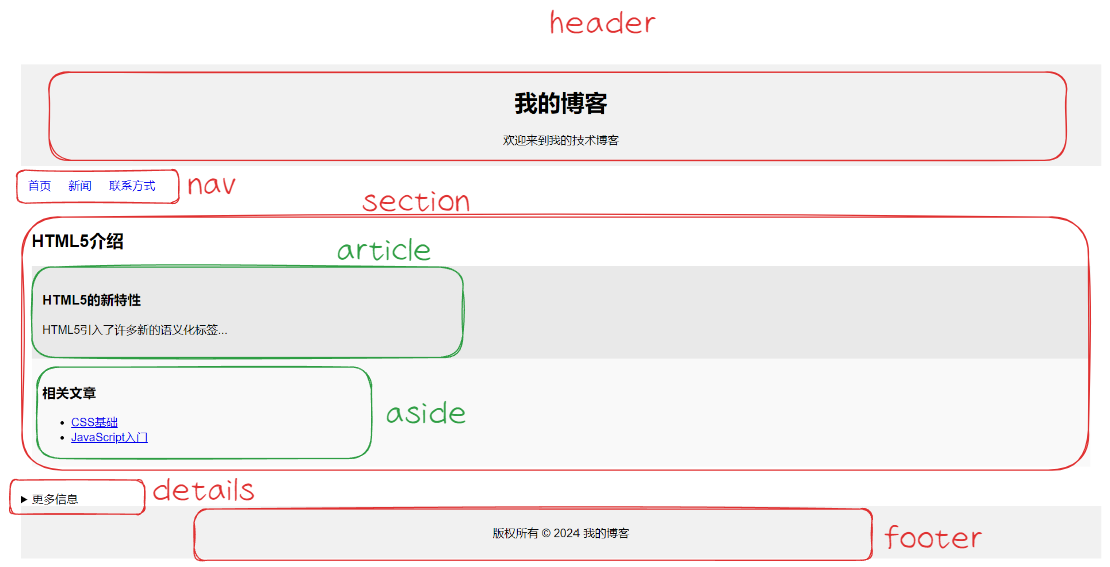
常用标签
[!hint] 内联标签 和 块级标签
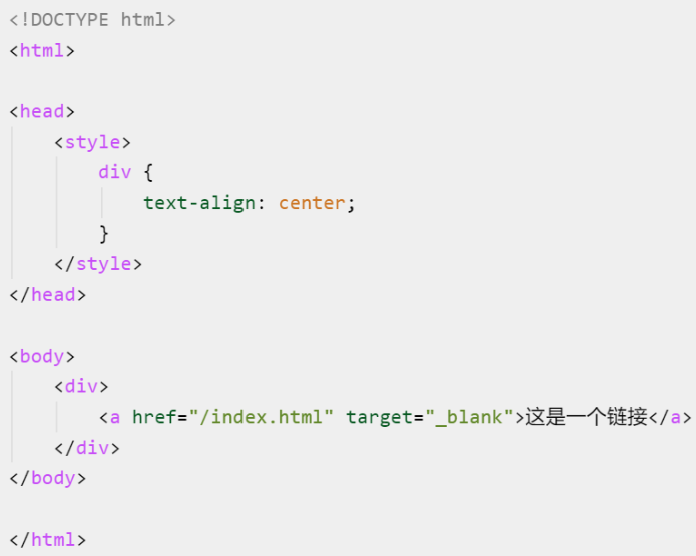
- 对于内联标签,属性只能影响其内部的文本内容,并不能改变整个元素在父容器中的状态。如果需要改变可以将内联标签放在块级元素中 / 使用其他布局技术【Flexbox 或 Grid】
- 对于块级标签,属性可以改变内部内容和整个状态
- 常见:div,h,table,form
例如:想让一个链接位于水平居中,必须
注释
<!--注释内容-->
标题<h>
一个标题独占一行,有 6 个等级的标题可以选择
<h1>我是一级标题</h1>
<h2>我是一级标题</h2>
…………
<h6>我是一级标题</h6>
段落<p>
段落之间会在网页显示时会有空隙
<p>你好,我是HTML 5</p>
<p>你好,我是HTML 5</p>

你好,我是HTML 5

你好,我是HTML 5
换行<br/>
一个段落中的文字会从左到右排列,直到浏览器窗口的右端才会自动换行,而换行标签可以对文本进行强制换行
<p>你好,我是HTML 5 你好,我是HTML 5
	你好,我是HTML 5 你好,我是HTML 5
	你好,我是HTML 5 你好,我是HTML 5 <br/>
	你好,我是HTML 5 你好,我是HTML 5
	你好,我是HTML 5 你好,我是HTML 5
	你好,我是HTML 5 你好,我是HTML 5
	你好,我是HTML 5 你好,我是HTML 5
	你好,我是HTML 5 你好,我是HTML 5
</p>
分割线<hr>
<span id="h001">2023年9月9日 20:38:00</span>
<hr>
文本格式
<b></b>加粗<i></i>倾斜<del></del>删除线<u></u>下划线<mark>高亮<sub></sub>下标<sup></sup>上标<blockquote></blockquote>长引用,浏览器会插入换行和外边距<q></q>短引用abbr缩写,悬浮时显示完整内容
<abbr title="World Health Organization">WHO</abbr><code>代码<pre></pre>预格式保留文本标签【用于多行·代码】
<pre>
	这是
	预格式文本。
	它保留了      空格
	和换行。
</pre>
---

这是
预格式文本。
它保留了      空格
和换行。<time>时间
/* datatime里的数据用于计算机解析 */
<time datetime="2024-03-15T09:00">2024年3月15日 上午9:00</time>
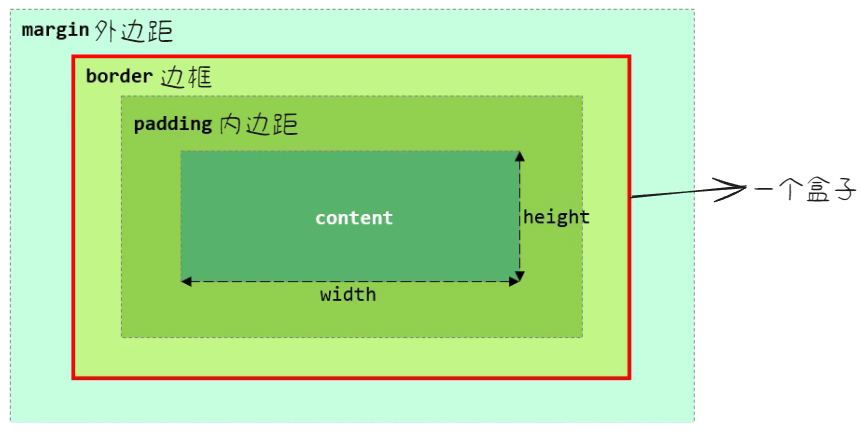
无语义盒子
这两个标签都是没有具体意思的,它们就是一个 盒子【用来装文字,图片,超链接】
<div>
一个
<div>独占一行
<span>
多个
<span>标签占一行
<span>标签无法设置 width 和 height,宽度和高度由内容默认撑开
超链接<a>
href指定的 URLtarget以哪种方式打开超链接- _self:【默认】在当前页面打开
- _blank:在新页面打开
- _parent:在该链接的父容器中打开
- _top:在该链接的最顶级父容器中打开
- frame 名:在某个指定的 frame 中打开
<a id="h002" href="https://www.zjxu.edu.cn/" target="_blank">嘉兴学院</a>

/* 用一张图片作为链接 */
<a href="/example/html/lastpage.html">
	<img border="0" src="/i/eg_buttonnext.gif" />
</a>
[!hint] 尽量在链接之后添加
/√:http://www.w3school.com.cn/html/×:http://www.w3school.com.cn/html,会产生两次 HTTP 请求
锚点链接
就像是 PDF 的目录一样
<h4 id="live">个人生活</h4>

/* 在当前页面引用 */
<a herf="#live">个人生活</a>

/* 在其他页面引用 */
<a href="demo.html#live">个人生活</a>
[!hint] 浏览器找不到命名锚,那么就会定位到文档的顶端
图片<img/>
属性之间要有空格 src 指定图片路径
alt 当图片因为某些原因无法显示时,显示该文字 title 提示文本【鼠标悬浮时显示该文本】
width 图像的宽度【单位可以是像素 px,也可以是百分比 %(百分比是相对于父元素的)】 height 图像的高度 border 图像的边框粗细
<img src="https://1b2a.net/img/tv/PwGW.avif" width="300" title="装腔启示录" />[!attention] 加载图片需要时间,慎用图片
[!hint] 尽量定义图像尺寸,避免图像逐步加载而导致的页面内容突然移动
图像映射
在图像里面划分区域创建链接
<area shape="circle" coords="180,139,14" href="/example/html/venus.html" target="_blank" alt="Venus" />:定义了一个圆形区域,圆心位于(180,139),半径为14,点击这个区域会跳转到/example/html/venus.html页面- ……
<area shape="rect" coords="0,0,110,260" href="/example/html/sun.html" target="_blank" alt="Sun" />:定义了一个矩形区域,坐标从(0,0)到(110,260)
<img src="/i/eg_planets.jpg" usemap="#planetmap" />

<map id="planetmap">
	<area shape="circle" coords="180,139,14" href="/example/html/venus.html" target="_blank" alt="Venus" />

	<area shape="circle" coords="129,161,10" href="/example/html/mercur.html" target="_blank"
			alt="Mercury" />

	<area shape="rect" coords="0,0,110,260" href="/example/html/sun.html" target="_blank" alt="Sun" />
</map>
图片文字解释<figure>

我来解释BootStrap 4
<figure>
	<img src="https://img-blog.csdnimg.cn/img_convert/e59a39b29154bf82e42061c447792a88.png" alt="The Pulpit Rock" width="304" height="228">
	<figcaption>我来解释BootStrap 4</figcaption>
</figure>
表格<table>
<tr> 一行 <th> 表头 <td> 表格单元格元素 <caption> 表格标题
<table border="1px" cellspacing="0" width="300px" align="center">
	<caption>明星信息</caption>
	<tr>
		<th>姓名</th>
		<th>性别</th>
		<th>年龄</th>
	</tr>
	<tr>
		<td>吴彦祖</td>
		<td>男</td>
		<td>48</td>
	</tr>
	<tr>
		<td>刘德华</td>
		<td>男</td>
		<td>58</td>
	</tr>
	<tr>
		<td>张学友</td>
		<td>男</td>
		<td>59</td>
	</tr>
</table>| 姓名 | 性别 | 年龄 |
|---|---|---|
| 吴彦祖 | 男 | 48 |
| 刘德华 | 男 | 58 |
| 张学友 | 男 | 59 |
横跨多行多列表格
colspan跨多列rowspan跨多行
/* 横跨两列 */
<table border="1">
<tr>
	<th>姓名</th>
	<th colspan="2">电话</th>
</tr>
<tr>
	<td>Bill Gates</td>
	<td>555 77 854</td>
	<td>555 77 855</td>
</tr>
</table>

/* 横跨两行 */
<table border="1">
<tr>
	<th>姓名</th>
	<td>Bill Gates</td>
</tr>
<tr>
	<th rowspan="2">电话</th>
	<td>555 77 854</td>
</tr>
<tr>
	<td>555 77 855</td>
</tr>
</table>
列表
无序列表
<ul>
	<li>Coffee</li>
	<li>Milk</li>
</ul>
有序列表
<ol>
	<li>Coffee</li>
	<li>Milk</li>
</ol>
自定义列表
<dl>
  <dt>名词1</dt>
  <dd>名词1解释1</dd>
  <dd>名词1解释2</dd>
</dl>
按钮<button>
<button type="button">Click Me!</button>Click Me!
图标<i>
<!DOCTYPE html>
<html>
	<head>
		<title>Google Icons</title>
		<meta name="viewport" content="width=device-width, initial-scale=1">
		<link rel="stylesheet" href="https://fonts.googleapis.com/icon?family=Material+Icons">         <!--引入谷歌icon库-->
	</head>
	<body>
		<i class="material-icons">cloud</i>
		<i class="material-icons">favorite</i>
		<i class="material-icons">attachment</i>   <!--指定class,再指定icon名-->
		<i class="material-icons">computer</i>
		<i class="material-icons">traffic</i>
		<br>

		<!--可以通过css更改icon的样式-->
		<i class="material-icons" style="font-size:24px;">cloud</i>
		<i class="material-icons" style="font-size:48px;color:red;">cloud</i>
	</body>
</html>