使用 Vue
局部使用 Vue 和 工程化使用 Vue 由于环境不一样,所以某些语法是不一样的
以下默认使用工程化来演示代码
局部使用 Vue
[!hint] 因为 Vue 是渐进式框架,可以 局部使用【使用 CDN 来引入
Vue,而不是npm】
模板代码
- 所有在 html 里用到的数据都要定义到
data(){……}函数中 - 所有在 html 里用到的函数都要定义到
method:{……}中- 在
methods中要使用到data()函数中的数据时,要使用this关键字
- 在
html
<body>
	<div id="app">
		<h1>{{msg}}</h1>
		<button @click="handle">点击我</button>
	</div>
</body>

<script type="module">
	/* 导入 */
	import { createApp } from 'https://unpkg.com/vue@3/dist/vue.esm-browser.js'

	createApp({
		data() {
			return {
				msg: "hello Vue3"  /* 定义数据 */
			}
		},
		methods: {
			handle: function(){
				this.msg="我被点击了";
			}
			……
		}
	}).mount('#app')    /* 挂载到某个html元素 */
</script>
工程化使用 Vue
[!quote] 工程化使用 Vue 工程化使用 Vue 就是使用
npm创建 Vue 项目
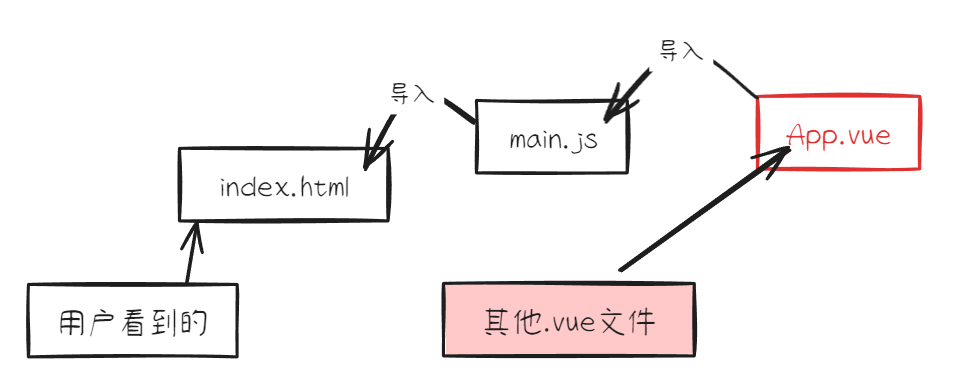
[!attention] 在全局使用 Vue 时,注意:
- 导入数据不能使用
createApp,因为createApp创建 Vue 实例,而 Vue 实例已经在入口文件【main.js】里面创建过了- 方法里要访问响应式数据,不用写
this关键字
模板代码
<script setup>js 代码【setup 必需加】- 从已经下载的
vue文件中导入各种函数 - 使用
ref()定义响应式变量,ref()会返回一个对象,这个对象的有一个指向内部值的属性value - 可以直接定义方法
- 使用
onMounted()钩子方法
- 从已经下载的
<template>html 代码<style>css 代码
html
%% html代码 %%
<template>
    <div>
        <h1>{{ count }}</h1>
        <button @click="increment">Increment</button>
    </div>
</template>

/* js代码,必须指明setup */
<script setup>
/* 从vue中导入ref()函数,onMounted()函数 */
import { onMounted, ref } from 'vue';

/* 使用ref()函数定义响应式变量 */
const count = ref(0);

function increment() {
	/* 在方法中使用count,需要.value才能拿到值 */
    count.value++;
}

onMounted(() => {
    alert('mounted!');
});
</script>

%% css代码 %%
<style></style>